Features
Cover sensitive material on screen with a redaction overlay
A juror in the front row can read a nine-digit number off a courtroom monitor. The exhibit may be properly in evidence and the account number on it may be entirely irrelevant, but once it is on the screen it has been shown to everyone in the room, including whoever is sitting in the gallery. The same problem shows up with a home address on a police report or a child's name on a school record.
Exhibit Room's redaction overlay is an opaque black box you draw over that part of the page so it is not visible when you present. Be clear about what it is: the overlay is for presentation only. It does not remove the content from the PDF file. The text, numbers and image data underneath are all still there. If you need the content actually gone from the document, you need true redaction, which is a different job and is covered in how to redact a PDF.
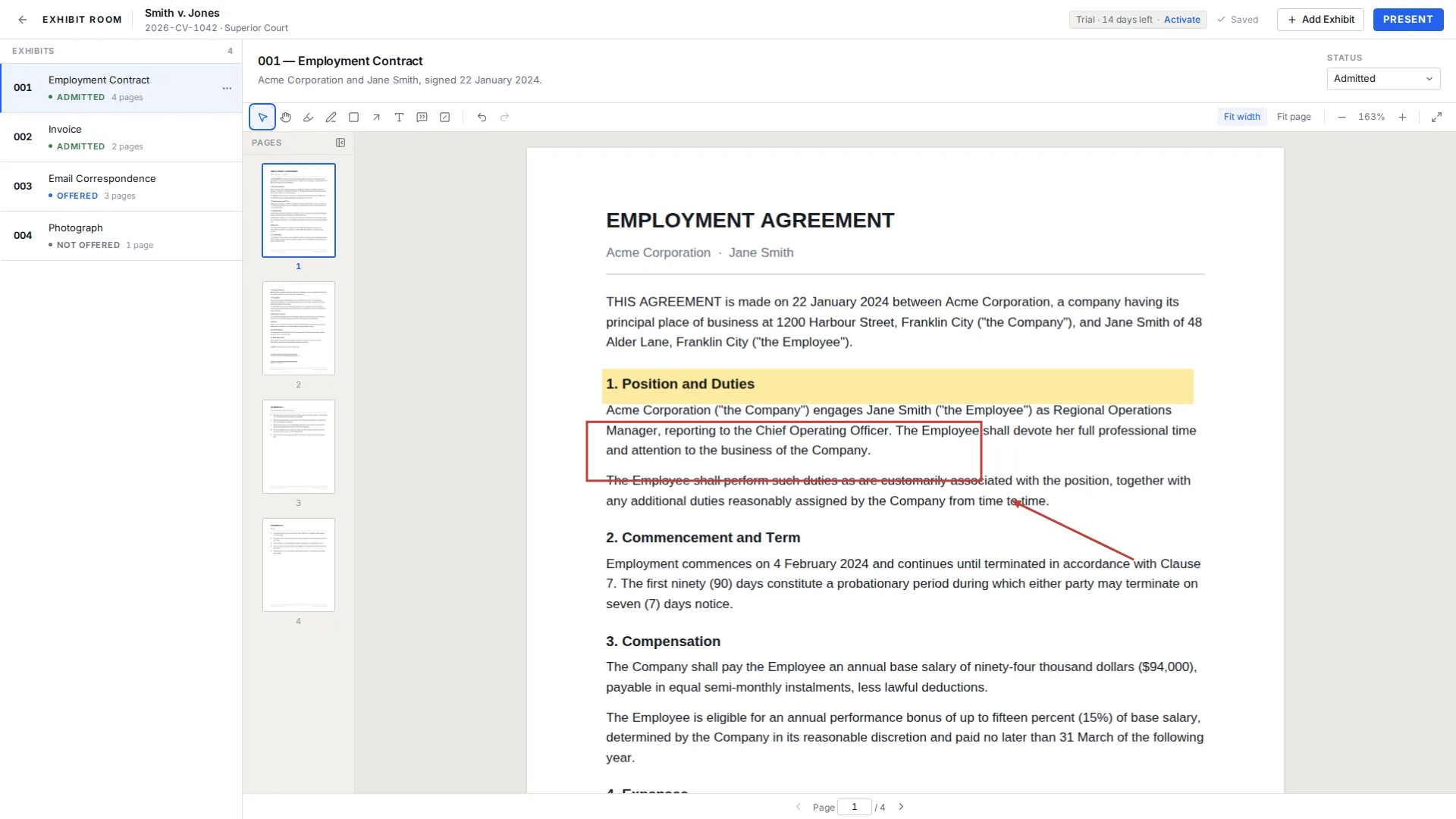
How the overlay works
Select the redaction overlay from the annotation toolbar and drag a box over the area you want hidden. It behaves like the other annotation tools: you can move it, resize it, undo it, delete it, and it is written to disk as you work. Draw as many as a page needs.
When the exhibit goes fullscreen in presentation mode, the boxes are there. Because the fullscreen view cannot be edited, nobody can drag one aside mid-examination by clicking in the wrong place. What you check in the viewer is what the room sees.
When the overlay is the right tool
It fits the narrow case where a document is already properly in the hands of everyone entitled to see it, and the only question left is what appears on the display. A bank statement that both sides have in full, offered for the date of a single transaction. A medical record where the diagnosis is at issue and the patient identifier is not, which comes up constantly when you present medical records in court. An exhibit that has been agreed for admission, where a party's phone number simply has no business being read out to a gallery.
It also fits the situation that happens at 8:40am in the courthouse hallway, when someone notices a number on page 4 nobody had looked at. Draw the box, check the page, walk in.
When you need true redaction instead
Any time the document itself is leaving your hands, the overlay is the wrong tool. Production to another party, a filing, an appendix, an email to an expert, a copy for the witness, a copy for the clerk: in all of these the recipient gets the file, and the file is unchanged. Handle those in software that removes the underlying content and re-writes the page, then bring the already-redacted PDF into Exhibit Room as the exhibit.
There is also a procedural side. Many courts have specific rules about what must be redacted from documents in the public record, and about whether a redacted version is filed alongside a sealed unredacted one. Those rules differ by jurisdiction and by case type, and they are worth reading before you decide what a screen should show.
Before you rely on an overlay
- Confirm the document is not one you will produce, file or hand over in this form
- Check the page at fit-page zoom, not zoomed in, so you can see the whole box
- Look for the same sensitive item elsewhere in the exhibit, including headers and footers
- Present the exhibit once, end to end, on the machine you will use in court
- If the content must genuinely be gone, redact the file properly and re-import it
Common questions
Does the overlay delete the text underneath?
No. It draws over the page. The PDF keeps every character, and Exhibit Room never modifies the file you imported.
If I send someone the PDF, will the box be on it?
No. The overlay is annotation data held by Exhibit Room, not part of the document. Anyone you send the original file to receives it exactly as it was.
Does the overlay appear when I present?
Yes. Overlays render in the fullscreen view along with your other marks, and that view cannot be edited, so a box cannot be moved by accident.
Can I use this to redact a document I am filing with the court?
No, and this is the one thing to take away from the page. A filed document must be redacted in the file itself, by software that removes the content.
Will Exhibit Room add permanent redaction?
It does not do permanent redaction today. We do not publish dates for work that has not shipped, so plan around what the app does now and write to support@exhibitroom.app if this is blocking you.
See exactly what the overlay does before you buy
No credit card required · Works offline · No subscription