One exhibit set for hearings, depositions and everything in between
Only a small share of the documents a litigator shows ever reaches a jury. Far more get shown across a conference table at a deposition, to a single arbitrator, or over video from your own office. The audience changes; the need to put one page in front of everyone at once does not.
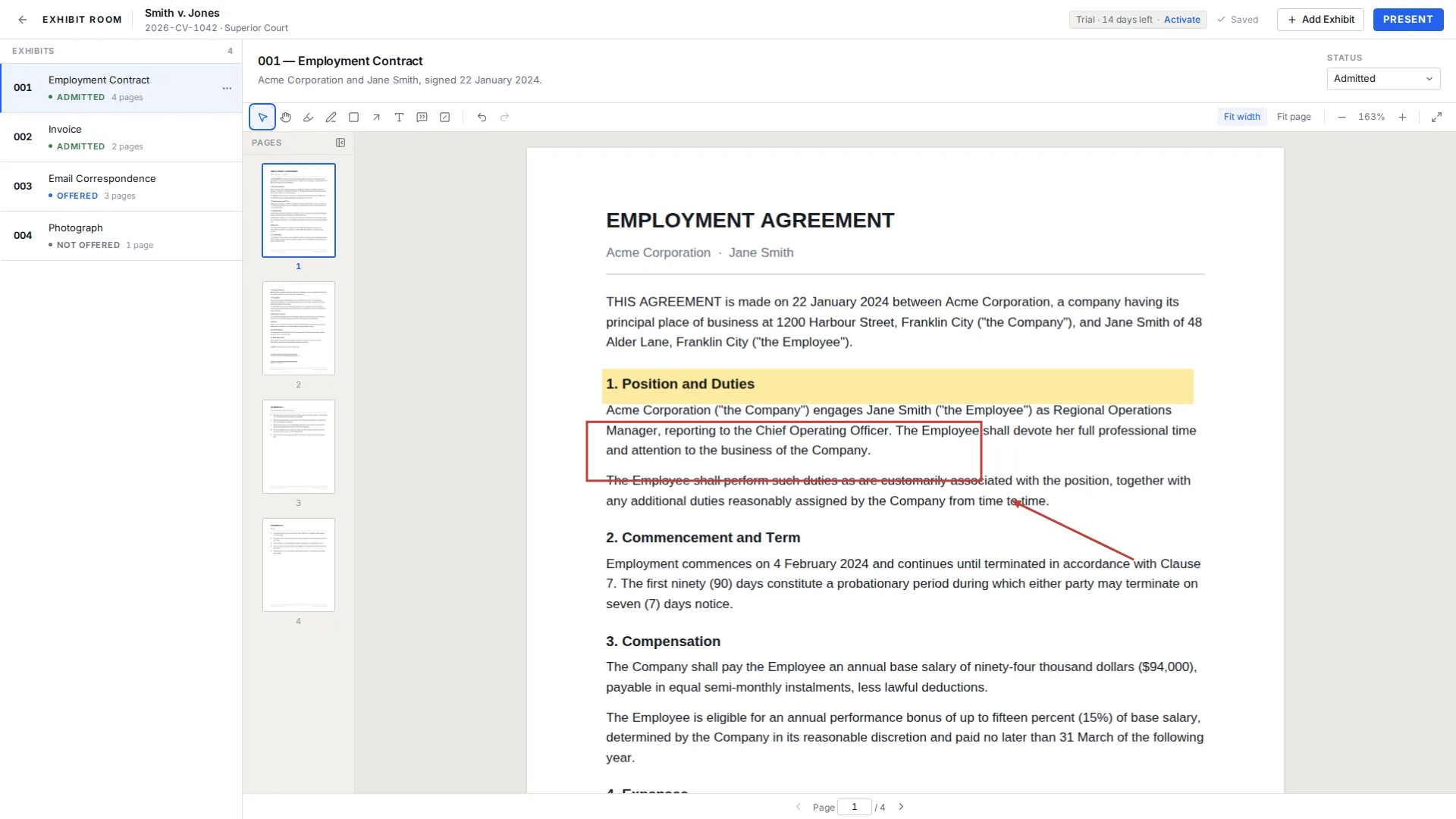
Exhibit Room is a desktop application for that act. Gather your PDFs into a set, mark the pages you expect to be asked about, and open any of them fullscreen, with no toolbars or file names in frame.
There is no server in the middle: what you load sits on your own machine, which matters more in some rooms than others and never matters less.
How it fits the courtroom workflow
Import. A proceeding begins as a trial record named for the matter, with room for the case number, court and parties. Exhibits are PDFs, one document each, added through the file picker or by dragging several onto the window; anything not already a PDF has to be converted first.
Prepare. Give each exhibit a number, a name and a description that still makes sense in six weeks, then order them to follow your argument or examination. Annotate with highlight, pen, rectangle, arrow, text and callout, all movable and removable afterward, saved as you work and kept apart from the PDF so the document is never altered.
Present. Press Present and the screen clears to a single page carrying an exhibit number, a name and a page counter, each of which can be switched off in Settings. Arrow keys turn pages, W fits the width, E opens the switcher, Esc ends it.
The same set, four different rooms
A motion hearing is short and narrow: four documents, ten minutes, and what matters is reaching the second paragraph of the third without a pause. Rehearse the jumps, not the speech. Hearing exhibits goes further.
A deposition is long and unpredictable, and the planned order rarely survives the first hour, so the switcher matters more than the sequence. Exhibit Room does not connect to a transcript or a reporter's system, so formal marking stays wherever the parties agreed. See deposition exhibits.
A mediation session is a negotiation with documents in it: one clause, one invoice, one photograph, shown to people who are often not lawyers. Fewer exhibits, more thought about the single page. See mediation exhibits.
An arbitration hearing sits between a bench trial and a long meeting, and panels often set exhibit conventions in a procedural order that the number field can simply follow. See arbitration exhibits.
Appearing over video
Remote appearances work through screen sharing. Exhibit Room opens a clean fullscreen page on your own screen, and you share that screen through whichever video conferencing application the court or the parties are using. It does not join the call and has nothing to configure.
That sets the boundaries. There is no remote control, so nobody on the other end can drive your exhibits; there is no mobile or tablet version and no iPad app, so the presenting machine is the laptop in front of you. Sharing a whole display or a single window is a choice inside the conferencing application.
Fullscreen is what makes a shared screen readable, since it removes the menus and window edges that eat half the frame on a participant's laptop. There is no separate presenter display, so what you see is what the room sees. Remote hearing exhibits walks through a dry run.
Where your client's documents actually live
Everything you put into Exhibit Room stays on your computer. PDFs, annotations and trial data are written to local storage and nothing is uploaded, because there is no account and no synchronized copy anywhere else.
The application works offline. A connection is needed once to activate a license and occasionally so it can be re-checked, and the application never locks in the middle of your work because it is offline, so hostile courthouse wifi is a non-event.
One consequence is worth saying out loud: if the only copy of a set is on one laptop, that laptop is a single point of failure, so keep your PDFs where the firm normally keeps case documents. The privacy page states what does and does not leave your machine.
A steady screen in a room with no jury
Small rooms are unforgiving: with four people around a table, everyone sees your desktop, your folder names and the notification that arrives at the wrong moment. Presentation mode shows the page and nothing else and refuses edits, so a stray keystroke cannot drag an annotation while an arbitrator is reading.
Annotations made during preparation appear in presentation, so decide beforehand whether the markup on a page is something the other side should read.
Where a page holds an account number or an unrelated client's name, the visual redaction overlay covers that area during presentation. Its limits matter: the overlay is a black box drawn over the page for presentation only, it does not remove the underlying content from the PDF file, and Exhibit Room does not do permanent redaction. For anything produced, filed or emailed, use a proper redaction process, and read visual redaction first.
What to have ready, by setting
| Proceeding | What to have ready |
|---|---|
| Motion hearing | A short set ordered to follow the argument, marked up on the passages you will read aloud. |
| Deposition | The whole document universe imported, with descriptions written for fast recognition. |
| Mediation session | A few exhibits, one page per point, with overlays over anything not meant for the shared screen. |
| Arbitration hearing | Numbering that matches the panel's procedural order, and status kept current across sessions. |
| Remote appearance | A tested screen share, the laptop plugged in, and notifications silenced before you share. |
Common questions
Can I use it in a deposition?
Yes. You can hold the whole document universe in a single set and reach any of it by number or name. It does not connect to a reporter's system, sync with a transcript, or handle formal marking, so those stay wherever the parties agreed.
Does it work for a remote hearing over video?
Yes, through screen sharing: Exhibit Room opens the exhibit fullscreen and you share that screen through the video conferencing application in use. It does not join the call itself and has no remote control, so you always drive your own exhibits.
Are my client's documents uploaded anywhere?
No. PDFs, annotations and trial data are stored only on your computer and nothing is uploaded. There is no cloud sync and no shared workspace.
Will it work on courthouse wifi, or with no connection at all?
It runs offline. A connection is needed once to activate a license and occasionally to re-check it, and it will not lock mid-work because it is offline.
Can opposing counsel or the arbitrator see my annotations?
They see whatever is on the screen you present, and annotations do show in presentation mode. Nothing else is visible to them, since there is no shared access to your set.
Is there an iPad or tablet version?
No. Exhibit Room is desktop software for Windows, macOS and Linux, and there is no mobile or tablet application.
Try it against your next hearing, deposition or mediation
No credit card required · Works offline · No subscription