Features
Move a whole trial to another computer
Two moments make this feature matter. The first is ordinary: you prepared the set on the office desktop and the trial runs off a laptop, and everything, including three weeks of annotations, has to arrive intact. The second is the one nobody plans for, when a machine dies on a Sunday night and the question is how many hours of work went with it.
Exhibit Room answers both the same way. Export a trial and you get one file, ending in .exhibitroom, holding the trial's details, every PDF in it, and every annotation on those PDFs. Import that file somewhere else and the set comes back as it was.
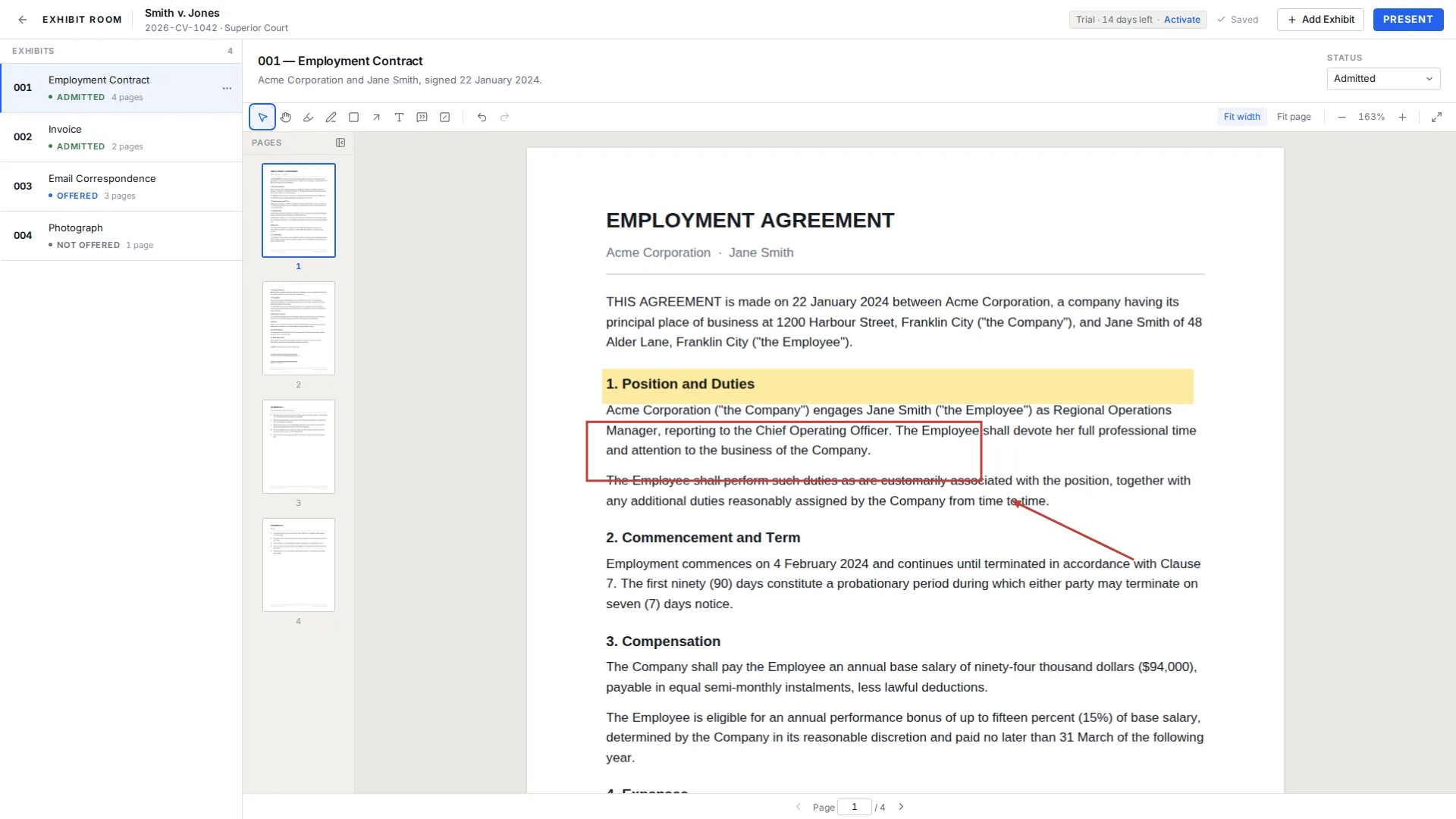
What is inside the file
The trial record itself, meaning the case name, number, court and parties. Every exhibit with its number, name, description and status. The PDF for each exhibit, in full. And the annotation layer for each one, so highlights, arrows, callouts and redaction overlays survive the trip.
Because the PDFs travel inside it, the file is roughly as large as the documents you imported. A set of scanned medical records is a big file; a set of twelve short contracts is not. Plan the drive you carry accordingly.
Export, carry, import
Exporting is a menu action on the trial and produces a single file wherever you choose to put it. Importing is the reverse, on the machine you want the set on. There is no account, no upload step and no intermediary, so the file only ever exists where you put it: your laptop, your external drive, the encrypted volume your firm requires.
One detail people get wrong once and never again: the export is a snapshot. Annotations you add after exporting are on the source machine only. Export last, after the set is finished, and if you keep working, export again.
A backup routine for trial week
- Export at the end of every preparation day, with the date in the file name
- Keep at least one copy on a drive that is not the trial laptop
- Do a real import onto the trial laptop, then open two or three exhibits and present one
- Re-export the evening before opening, after the final changes
- Store copies wherever your firm's confidentiality policy says client material belongs
Limits to plan around
Backups are manual. Exhibit Room does not run a scheduled backup and does not copy anything to a server, so the routine above is on you and nobody will nag you about it. That is the cost of keeping everything local.
Transfers are also whole-trial and one-directional. There is no merge: if two people both annotate their own copy, you get two versions and someone has to choose. A license covers two computers, which is generally the office machine and the trial laptop; a second person working in parallel needs their own license, and Exhibit Room for litigation teams explains how to divide the work so the merge problem never comes up.
Backup questions
Do my annotations come across?
Yes. The annotation layer for every exhibit is part of the exported file, so a set arrives on the other machine marked up exactly as you left it.
Is there automatic or cloud backup?
No. Exports are manual and the resulting file stays wherever you save it. Nothing is copied to us.
Can I run the same trial on two computers?
Yes, and a license covers two. Just decide which machine is authoritative, because changes made on one do not flow to the other.
What is the one thing to do the night before trial?
Import your latest export onto the trial laptop and actually present an exhibit from it. A backup you have never restored is a hypothesis.
One license, your desktop and your trial laptop
No credit card required · Works offline · No subscription