Running a multi-day trial out of one laptop
A trial is not one event. It stretches across days, and the document you expected to use Tuesday morning ends up in front of a witness late Thursday.
Exhibit Room is a desktop program for that stretch. You load PDF exhibits once, give each a number and a name, mark the passages you will read, and put any page on the screen with a couple of keystrokes. It runs on Windows 10 or later (64-bit), macOS 12 Monterey or later on Apple Silicon and Intel, and Linux as an AppImage or .deb.
What follows is one trial in order, from the weekend before to the last witness.
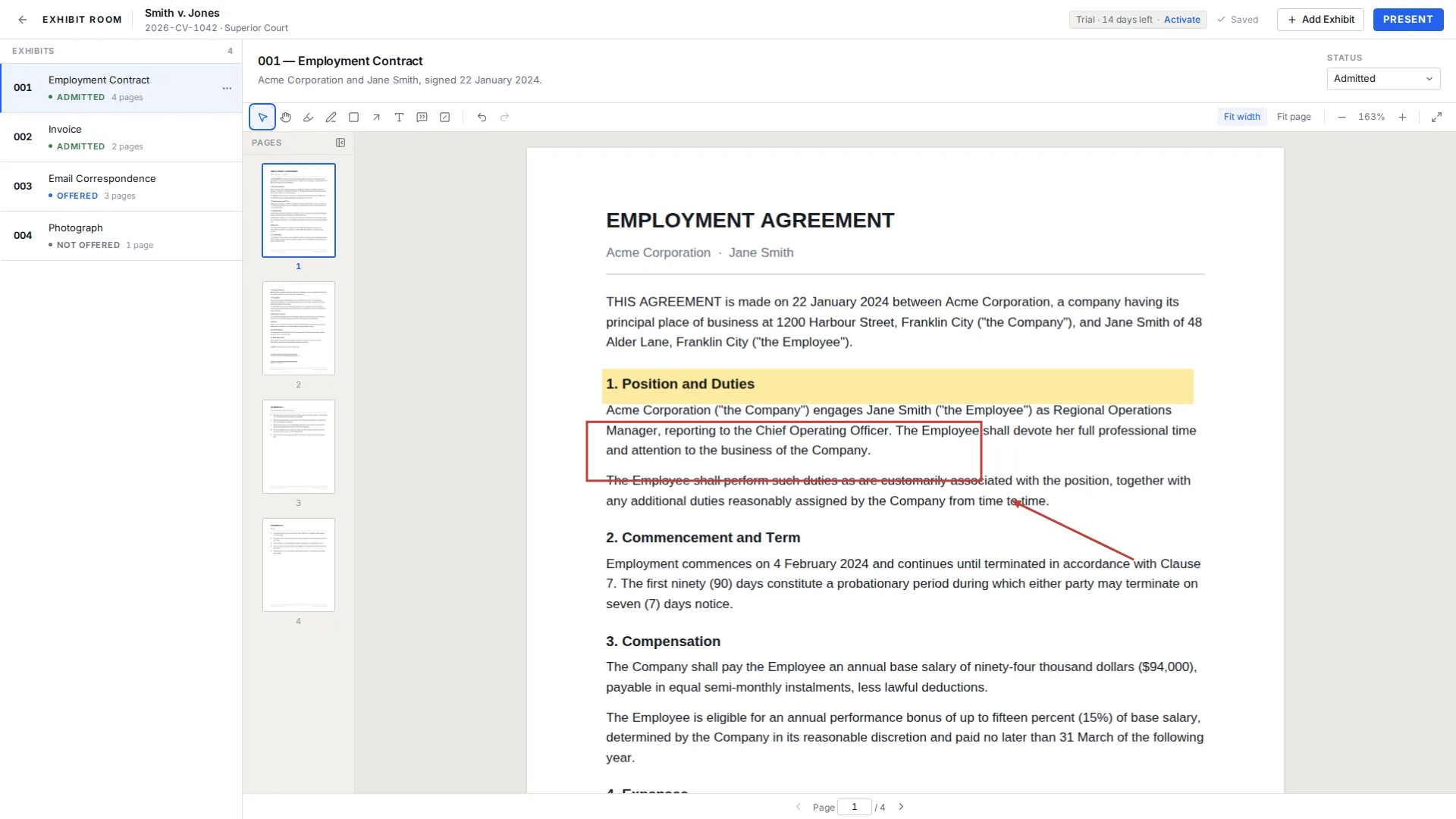
How it fits the courtroom workflow
Import. Select a batch of PDFs in the file picker, or drag a handful onto the window, and each becomes an exhibit with a number, a name, a description and a status. Several can arrive together, which matters when a late production lands overnight.
Prepare. Open an exhibit and read it the way you will read it aloud. Highlight the sentence, box the line item, put an arrow beside the date that does not match. Annotations sit apart from the document, so the PDF is never rewritten.
Present. One press fills the screen with the page. Arrow and page keys move through pages, E opens the exhibit switcher, and Esc returns you to the manager.
The days before the first witness
Create the trial first. Case name is the only required field; case number, court and parties are optional and worth adding, because in a month you will have several trials on one machine.
Numbering defaults to 001, 002 and upward, or use whatever the case calls for, including A, B, A-1 or P-12. Write the name the way you think of the document, not the way the scanner saved it, and give each a one-line description. Reorder until the list tracks your outline, and if a document is superseded, replace the PDF on the existing exhibit so the number and every mark stay on one row. How to prepare exhibits for trial covers this stage.
Mark up early. Highlight, pen, rectangle, arrow, text and callout are all there, everything autosaves, and undo and redo behave normally. The visual redaction overlay draws a black box over an area for presentation only: it hides that area on screen, it does not remove the underlying content from the PDF file, and Exhibit Room does not do permanent redaction, so a copy shared with anyone else still carries what sat beneath the box.
Rehearse on the fictional Smith v. Jones demo trial that ships with the app rather than on a client file.
What a courtroom day feels like
The window sits beside your outline. You work from the outline and reach for the app when a document needs to be on the screen; because the switcher takes a number or part of a name, you rarely scroll the list while standing.
Status is the other half of the day. An exhibit moves from Not offered to Offered, then to Admitted, Rejected or Illustrative as the court rules. You change it from the exhibit's context actions when it happens, not from memory at lunch. Status is always written as text next to the exhibit rather than shown only as a color, so the list reads over a shoulder or to a colleague who has never opened the app. Exhibit status tracking explains that column.
Pages render as you reach them, so a long medical chart opens without a wait, and nothing can be edited while presenting.
Moving the trial to a second computer
The prep machine is often not the machine that goes to the courthouse, and laptops fail at inconvenient moments. A whole trial, with its metadata, its PDFs and every annotation, exports as one .exhibitroom file you can copy to a drive and import elsewhere. The license covers two computers, usually the desk machine and the trial machine.
Backups are manual and stay with you: nothing is sent anywhere, and no server copy exists for someone else to restore. Export after a substantive prep session and again at the end of each trial day. Trial backup and transfer describes the import step.
An exported trial is a snapshot, not a live link. If a colleague imports your file and annotates an exhibit, those marks stay on their laptop. There is no shared workspace and no merge.
The honest scope of the tool
Exhibit Room does one job: PDF exhibits, prepared and presented. The boundary is worth more than a feature list.
PDF only. Photographs, emails, contracts, invoices and records all work once they are PDFs, and converting them happens elsewhere. There is no video or audio playback, no transcript handling and no deposition synchronization.
Nothing is in the cloud: no cloud sync, no shared team workspace, no mobile or tablet version, and no dual monitor presenter view. Redaction is visual only, and permanent redaction, PDF text search, optical character recognition and Bates stamping sit outside the app.
A trial week, start to finish
| When | What you do in Exhibit Room |
|---|---|
| The weekend before | Create the trial, drag in the PDFs, set numbers, names and a one-line description each. |
| Prep week | Reorder to match the outline, highlight passages, add arrows, place visual redaction boxes. |
| The night before | Rehearse in presentation mode and export a .exhibitroom file to a drive. |
| During testimony | Press Present, reach an exhibit by number or name, move by page, exit with Esc. |
| Each break | Set status to Offered, Admitted, Rejected or Illustrative. |
| End of the day | Adjust annotations for tomorrow and export a fresh backup. |
Questions from trial teams
Can Exhibit Room play video or audio exhibits?
No. It works with PDF exhibits only. If part of your case rests on a recording, plan to run it from a separate player.
Does it sync with transcripts or deposition video?
No. There is no transcript import, no text synchronization and no deposition video feature.
Can co-counsel have the same trial on their own laptop?
Yes, by exporting the trial as a .exhibitroom file and importing it there; the license covers two computers. The copies are independent, so edits on one do not appear on the other.
Is this a subscription, and does it need internet during trial?
It is a one-time purchase of $149 that includes updates. It works offline; a connection is needed once to activate a license and occasionally to re-check it, and the app never locks mid-work because it is offline.
Is there anything to practice on first?
Yes. The fictional Smith v. Jones demo trial is installed with the app, so you can rehearse without opening a client file.
What happens to my material if I stop using the app?
Your PDFs remain your PDFs. Originals are never modified, annotations are stored alongside them, and everything lives on your own computer.
Load one trial and see how the week goes
No credit card required · Works offline · No subscription