Showing PDF exhibits when nobody is running the laptop but you
Plenty of lawyers walk into a hearing with a laptop, a short stack of PDFs and nobody to drive the screen. No technician, no war room, no budget line for a presentation service. The software has to be something one person can learn on a Sunday and operate while thinking about something else.
Exhibit Room is built around that constraint. It is a desktop application for Windows, macOS and Linux that takes PDF exhibits, lets you number and mark them, and shows any page fullscreen with the interface stripped out. It costs $149 once, covers two computers, and has a 14-day free trial.
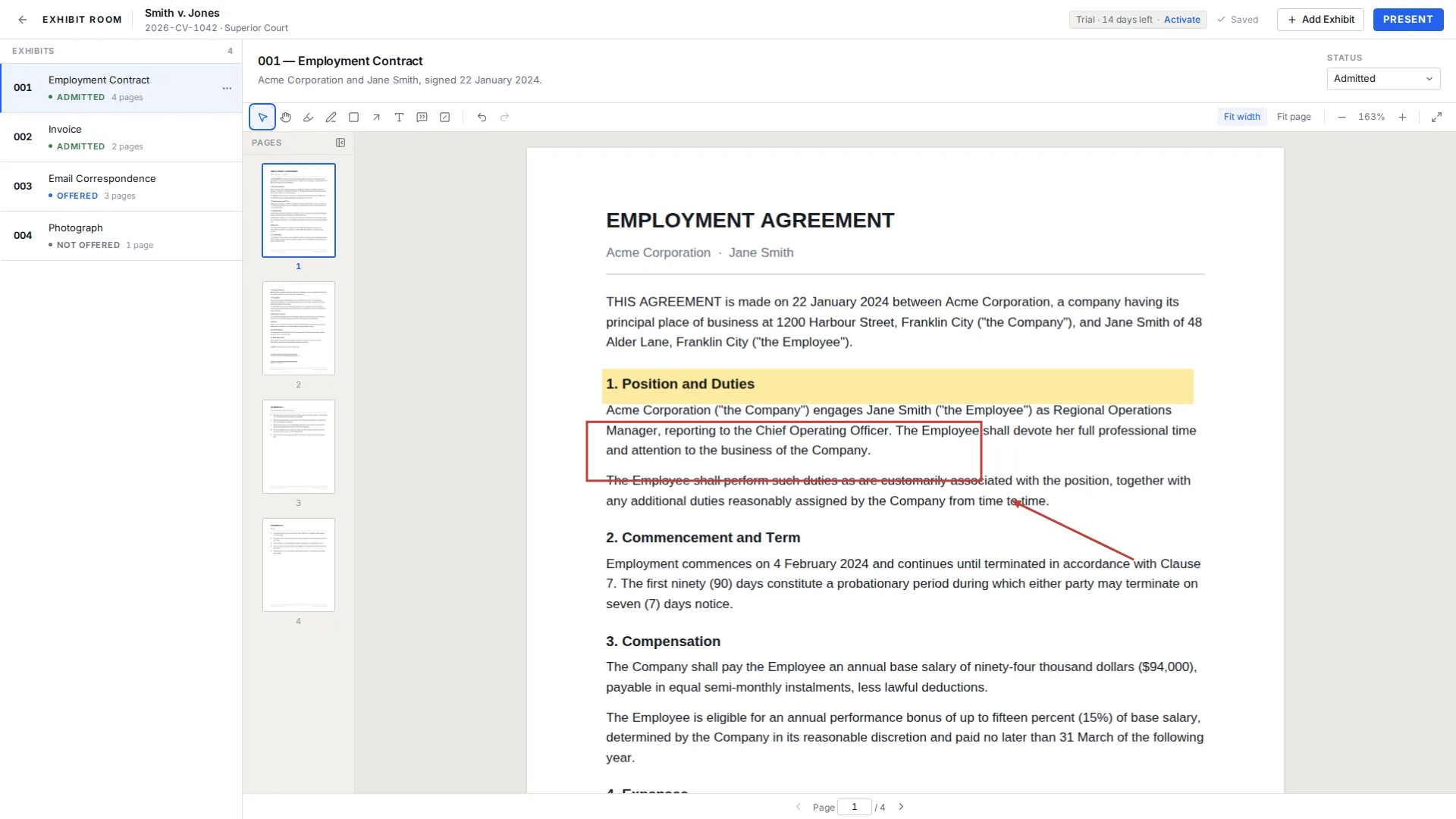
How it fits the courtroom workflow
Import. Documents arrive as PDFs from a scanner, a filing portal or opposing counsel. Drop them onto the window, singly or as a group, and each becomes an exhibit you can number, name and describe. PDF is the only accepted format.
Prepare. Reading an exhibit inside the app is how you decide what the court will actually look at. Zoom, fit width, jump to a page, then mark what matters with a highlight, a pen stroke, a box, an arrow or a callout. Marks autosave and sit beside the file rather than inside it.
Present. The page fills the screen with only the exhibit number, name and page counter around it, each of which can be switched off in Settings. How to present a PDF in court walks through a first run.
The night before, with six PDFs and no assistant
Say tomorrow is a two-hour hearing and you have six documents: a lease, two emails, a repair invoice, a scanned photograph and a forty-page inspection report. This is an evening task, not a project.
Make the matter, typing in the case name and adding the court and case number so you cannot open the wrong one. Select all six PDFs in the file dialog and bring them in together. They land as exhibits 001 through 006 in the order you picked them, and you drag them into the order you will use. Name them plainly: Lease dated March 14, Tenant email to landlord, Landlord reply, Invoice from the plumbing contractor, Photograph of the ceiling, Inspection report.
Then the marks. Highlight the two lease clauses you will read, box the total on the invoice, arrow the part of the photograph you will ask about. If something on a page should not be on the screen, place a visual redaction box over it and know what that is: a black box drawn over the page for presentation only. It does not remove the underlying content from the PDF file, and Exhibit Room does not do permanent redaction, so anyone opening that PDF elsewhere sees what is beneath the box.
Finish in the Smith v. Jones demo trial: arrow keys, E for the switcher, W for fit width, light or dark background.
What the price includes
Exhibit Room is $149 as a one-time purchase. There is no subscription, and updates are included in what you paid. The app tells you when a new version exists and installs it when you choose, so an update never arrives uninvited in a hearing week. One license covers two computers, usually the office desktop and the laptop that goes to court.
Before paying anything you get a 14-day free trial. Every feature is in it and no credit card is required. Your documents are never watermarked; a small Exhibit Room mark shows in the corner of presentation mode until you activate a license. The fourteen days begin the first time you open the app rather than when you fill in a form.
One more thing worth knowing: an early-adopter discount is currently available on the pricing page, under the code EARLY50. Terms are on the pricing page and the installers are on the download page.
Where your client documents actually live
On your computer, and nowhere else. The PDFs you import, the annotations you draw and the case details you type are stored locally. Nothing is uploaded, and no server copy exists to be produced, breached or lost by someone you have never met. Settings shows the data location, so you can see exactly where client material sits on disk.
The internet touches the software in one narrow place: licensing. A connection is needed once to activate, and occasionally afterward to re-check the license. That check is not a gate on your work, because the app never locks in the middle of what you are doing for being offline, which matters in a courthouse basement with no signal. Offline courtroom presentation has the detail, and the privacy page states the position.
What the app leaves out on purpose
A careful buyer wants the gaps before the features. The app accepts PDFs only: no import from Word, Excel or image files, no optical character recognition, no text search inside a document and no Bates stamping.
It is also not a practice system. No case management, no calendaring, no billing, no e-signature, no client portal. It does not print exhibit lists, produce exhibit stickers or labels, or offer artificial intelligence features. If the clerk wants a list on paper, keep one alongside; the trial preparation checklist is a reasonable start.
Nothing is collaborative and nothing is mobile: no cloud sync, no shared workspace, no tablet or phone version, no remote control, no dual monitor presenter view. Video and audio exhibits are out of scope, as are transcripts and deposition synchronization.
Licensing and trial, in one place
| Question | Answer |
|---|---|
| What does it cost? | $149, paid once, with no subscription or renewal. |
| How many computers? | Two per license. |
| Are updates extra? | No. Updates are included and install when you choose. |
| How long is the trial? | 14 days, starting the first time you open the app. |
| Is the trial limited? | No. Every feature, no credit card. A small Exhibit Room mark shows in the corner of presentation mode until you activate. |
| Which platforms? | Windows 10 or later (64-bit), macOS 12 Monterey or later, Linux as an AppImage or .deb. |
| Is internet required? | Only to activate the license and occasionally to re-check it. |
| Where is support? | support@exhibitroom.app, or the [support page](/support). |
Buying questions
How much is Exhibit Room, and does it renew?
It is $149 as a single purchase and it does not renew. There is no subscription tier and no maintenance fee, and updates are part of what you bought.
How many computers does one license cover?
Two, intended for a main working machine and the laptop you take to court. Device status is visible in Settings.
Does the free trial hold anything back or add a watermark?
No feature is held back and no credit card is needed. Your documents are never watermarked. While the copy is unlicensed, a small Exhibit Room mark shows in the corner of presentation mode, and it goes away when you activate. The clock starts the first time you open the app.
Which operating systems are supported?
Windows 10 or later in 64-bit, macOS 12 Monterey or later on Apple Silicon and Intel, and Linux as an AppImage or a .deb package.
Are my client PDFs uploaded anywhere?
No. Documents, annotations and case details stay on your own computer. Settings shows the data location if you want to check exactly where they sit.
What if I am offline, and how do I get help?
Activation needs a connection once and the license is re-checked occasionally, but the app does not lock mid-work when there is no connection. Otherwise write to support@exhibitroom.app or use the support page.
Try it on your next hearing bundle for fourteen days
No credit card required · Works offline · No subscription